How to Build an SEO Content Calendar From Keyword Research
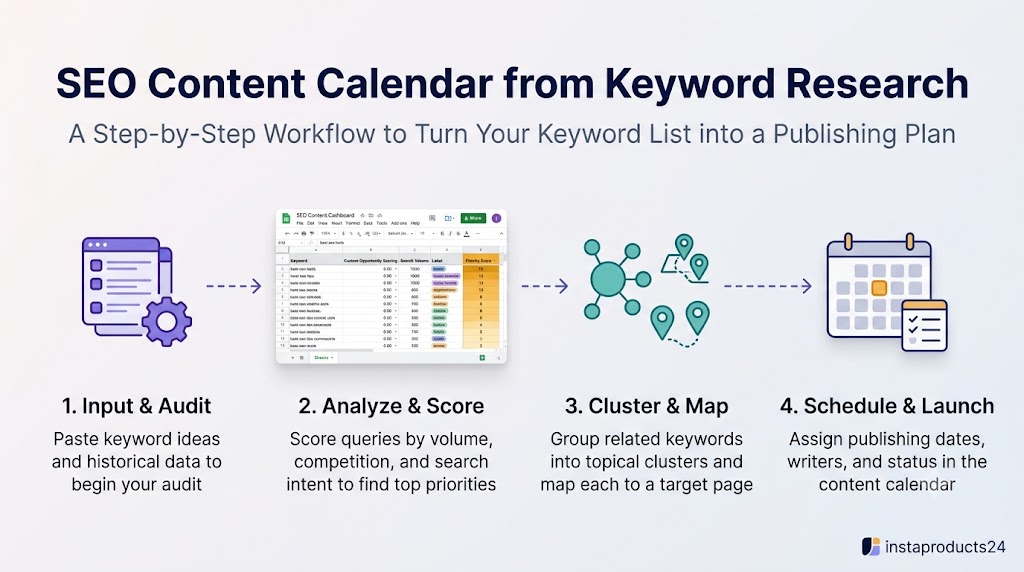
An SEO content calendar from keyword research turns a list of search opportunities into a realistic publishing plan. It helps you decide what to publish, why it matters, which page should target each topic, and when work should happen. Without a calendar, keyword research often stays in a spreadsheet while publishing becomes reactive. A useful calendar connects audience needs, priority, content format, ownership, and deadlines.
What should an SEO content calendar include?
At minimum, track the primary keyword, working title, search intent, content type, priority, target URL, content status, owner, planned publish date, and notes. Depending on your workflow, you may also record secondary keywords, cluster ID, brief link, update date, and performance review date. Keep the calendar easy enough to maintain; too many fields can make the process harder than the writing.
Step 1: Start with cleaned keyword research
Remove irrelevant terms and exact duplicates, then check whether each remaining keyword matches your audience and site. Add volume and difficulty estimates if useful, but do not let these metrics make the decision alone. Include the search intent and note whether an existing page already addresses the topic. This initial cleanup prevents the calendar from becoming a queue of low-fit ideas.
Step 2: Score and prioritize topics
Rank opportunities using relevance, search demand, ranking potential, business value, and effort. Define simple priority levels such as high, medium, and low. Make the criteria consistent across the project. A topic with lower search volume may deserve early attention if it supports a key product or fixes a content gap. A large, competitive topic may be scheduled later if it requires substantial research.
Step 3: Cluster keywords and map pages
Group keywords by shared intent and decide which page should serve each group. Choose a primary keyword for planning and add secondary terms that belong naturally on the same page. Assign an existing URL or a proposed URL. This step helps avoid creating multiple posts for the same need and gives writers a clear scope.
Step 4: Choose the right content format
The keyword and its intent should guide the format. Informational queries may need tutorials, explainers, checklists, or troubleshooting guides. Commercial investigation may call for comparisons, product roundups, or evaluation criteria. Transactional topics may fit product or landing pages. Check current search results for the important terms and choose the format that best answers the query.
Step 5: Estimate effort and set dates
Build a schedule that matches your actual capacity. Consider research, outlining, writing, editing, expert review, design, publishing, and promotion. Do not schedule more content than you can maintain. For a solo blogger, one well-researched article per week may be more sustainable than a daily publishing target. Use deadlines as planning tools and adjust them when the scope changes.
Step 6: Track production status
Useful statuses include Idea, Brief Created, Writing, Editing, Ready to Publish, Published, and Optimizing. Assign an owner even if that owner is you. Record blockers such as missing screenshots, product testing, subject-matter review, or internal links. A status field makes it easier to see whether the bottleneck is research, production, or approval.
Step 7: Review and update published content
A calendar should not stop at publication. Set a review date based on the topic’s freshness needs and performance. Use Search Console to review queries, impressions, clicks, and page trends; use analytics or conversion data where appropriate. Update a page when it needs better coverage, clearer answers, current information, or stronger internal links. Not every page needs the same review interval.
Example content plan
Suppose your site publishes SEO resources. A central guide on blog keyword research could be supported by articles on search intent, keyword scoring, keyword clustering, keyword cannibalization, content calendars, and affiliate keyword research. Each page serves a distinct question and links to related guides where useful. Schedule foundational articles first, then publish supporting pieces that expand the topic and strengthen the reader’s path through the site.
Simple calendar columns
A practical spreadsheet might contain: Content ID, Primary Keyword, Secondary Keywords, Search Volume, Difficulty, SEO Score, Priority, Intent, Funnel Stage, Content Type, Target URL, Existing/New, Status, Working Title, Brief, Publish Date, Assigned To, and Notes. Keep formula-driven fields separate from manual decisions. If rows are automatically sorted, avoid typing manual notes beside changing rows unless they are linked by a stable ID.
Common mistakes
Avoid choosing dates without considering production effort, creating a calendar without assigning owners, treating every keyword as a separate post, and forgetting post-publication updates. A calendar is a working system, not a promise that every date will remain fixed.
Conclusion
To build an SEO content calendar, clean the keyword list, prioritize opportunities, cluster terms, map them to URLs, choose formats, schedule work, and review published pages. SEO Keyword Research OS from instaproducts24 is intended to connect keyword analysis with priority lists, a content map, and a publishing calendar in Google Sheets. Check the current template details and adapt the workflow to your team’s capacity.
Frequently asked questions
How many posts should I publish per week for SEO?
Choose a schedule you can sustain while maintaining quality. Publishing frequency depends on resources, topic complexity, and the site’s needs.
What is the difference between a content map and a content calendar?
A content map connects topics and keywords to pages; a calendar adds timing, status, and ownership to the production plan.
Should I schedule updates as well as new articles?
Yes. Existing pages may offer useful opportunities for refreshing information, improving intent alignment, or consolidating overlap.
Which tool is best for an SEO content calendar?
The best tool is one your team can keep updated. A spreadsheet can work well for small sites; larger teams may need a dedicated project management system.
How often should I review the calendar?
Review it regularly—often weekly for production and monthly or quarterly for priorities—depending on publishing volume and how quickly the topic changes.